Showing posts with label GitHub. Show all posts

19 December 2016

On relicensing etiquette

Almost 10 years ago, I wrote a simple throwaway script to migrate book collections from Anobii to Goodreads. Because I thought others could use it, I slapped a MIT license on it and released it. Back then Github was just a fledging startup (I didn't even open an account there before 2010). Later on, Alper Çugun helpfully updated the script and uploaded it to GH, so that more people could use it. Great! People started forking it and tweaking it, as they should. Except...
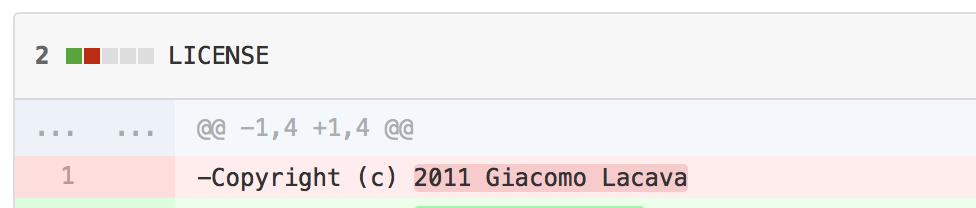
Uhm. There is one requirement to abide to MIT terms: keep the original copyright assignment. Apart from that, you can rip the code inside out and nobody will care; you can even relicense it to your heart's content (and someone did exactly that, re-releasing it as GPL - unfortunately, he also dropped the original copyright statement). Just leave the original copyright notice somewhere, and you're golden.

I've kindly let "infringers" know that I'd like them to reinstate the original credits -- it's just polite, and anyway everyone can see from GH commit history that they're being silly. Why do people do this? How hard is it to just add your own © line, or keep the original statement buried somewhere? Sometimes I just don't understand People.

21 July 2013

How to make pull requests on GitHub or BitBucket

Github and Bitbucket make it very easy to submit pull requests; probably too easy, in fact. The temptation to just fork somebody's repo, fix the obvious mistake and submit a pull request is quite strong. But that's not how you're supposed to work! So this is basically a dummy's guide to mark this procedure into my brain.

A pull requests marries the entire branch to the one you're targeting; if you keep making changes here and there, a pull request will include all these new changes, regardless of when you originally opened it. It makes your request basically un-mergeable by upstream repositories, in most cases.

So the real procedure is:

  1. Fork the upstream repository. Now you have your own master branch. Clone it locally as usual.
  2. Create a new branch, either via web or (easier) from the command line with git branch FixBugBranch && git checkout -b FixBugBranch. 
  3. Make your changes on this FixBugBranch. Make only the minimum amount of changes necessary to fix a specific issue, then commit and push.
  4. On GitHub, create a pull request from FixBugBranch towards the original repository
  5. When/if your pull request is accepted upstream, you can delete FixBugBranch.
If you want to make further changes, you can either create a further branch from FixBugBranch, or create and merge a pull request from FixBugBranch into your master. The important thing is that you don't touch FixBugBranch anymore, so that upstream maintainers won't receive all your extra commits but only ones relevant to the particular bug you raised.